Veeam Data Cloud for Microsoft 365
Resilient data protection made simple.
- Trusted, industry-leading Microsoft 365 Backup technology
- All-inclusive backup service with unlimited storage
- Powered with new Microsoft 365 Backup Storage
Overview
Resilient Data Protection Made Simple for Microsoft 365
Veeam Data Cloud for Microsoft 365, powered with Microsoft 365 Backup Storage, is a backup service providing comprehensive data protection and data recovery for Microsoft Exchange, SharePoint, OneDrive for Business, Teams, and with support for Entra ID protection, giving you complete control of your Microsoft 365 environment.
- Trusted, industry-leading technology
- Modern, secure and intuitive
- Everything is included
Microsoft 365 Cyberattacks and Data Loss Are Common
of enterprises will prioritize backup of SaaS apps as a critical requirement by 2028, compared to 15% in 2024 (Gartner, 2024)
of organizations are very likely to utilize BaaS within the next two years (Veeam Data Protection Trends Report 2024)
Veeam recovers Microsoft 365 data dramatically faster than manual restore methods
Benefits
The Shift to Microsoft 365 Backup Services
88% of enterprises are either very likely or almost certain to use Backup as a Service (BaaS) within the next two years. The shift towards using BaaS for Microsoft 365 data is driven by needing to simplify backup operations and offload infrastructure management, product updates and security patches, saving time, money, and much more.

Comprehensive Microsoft 365 Backup Service
Veeam Data Cloud for Microsoft 365, powered with Microsoft 365 Backup Storage, provides comprehensive data protection and data recovery for Microsoft Exchange, SharePoint, OneDrive for Business, Teams, and with support for Entra ID data protection, giving you complete control of your Microsoft 365 environment.
Trusted and Industry-Leading
The most comprehensive data protection solution with over a decade of continuous innovation built to scale.
Modern, Secure, and Intuitive
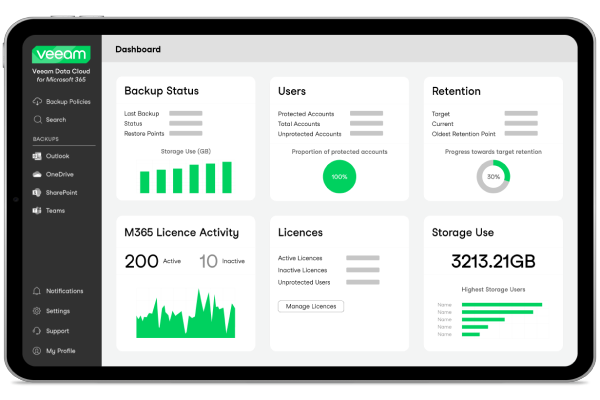
Create backup policies, complete restores, and gain Microsoft 365 insights easily from within a modern web UI.
Everything is Included
Software, backup infrastructure, and unlimited storage bundled together at one predictable cost.
Why Back Up With Veeam
Future-Ready Integration With Microsoft 365 Backup Storage
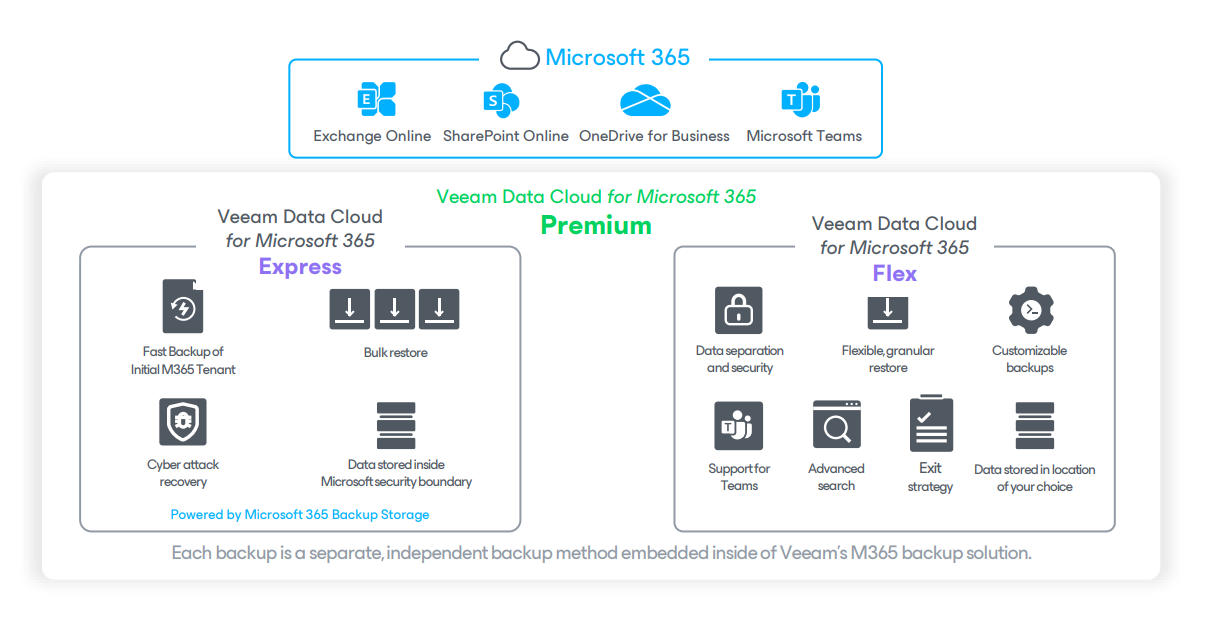
Microsoft's backup solution is embedded inside Veeam Data Cloud for Microsoft 365, empowering organizations to quickly and confidently bounce back from any Microsoft 365 cyberattack or data loss scenario. It can be utilized as part of Veeam's Express and Premium plans. Veeam's plans consist of:
- Flex: delivers data protection control with customizable retention, granular recovery, data export options, and more. It also includes the option to bundle with Entra ID protection.
- Express: powered by Microsoft 365 Backup Storage, Express offers lightning-fast backup and restore speeds with no throttling.
- Premium: the best of both worlds; speed and scale meet control and flexibility, all within one central location. Entra ID protection is included.
Key Capabilities
Powerful Yet Simple Microsoft 365 Backup Service
The most trusted, industry-leading features for Microsoft 365 backup in a secure, reliable backup service.
Backup Made Simple
Simply log in through a web browser and begin creating your first backup policy, automating backup and retention policies for easy setup.
Secured & Deployed For You
Save time by offloading ongoing maintenance to the experts and stay up to date with the latest features and security fixes automatically.
Data Sovereignty
Store all your Microsoft 365 data in the cloud region of your choice and gain full control of your retention period.
Lightning-Fast Backups & Restores
Specifically designed for large Microsoft 365 environments, seamlessly protecting and restoring 100+ TBs of data or 10,000+ objects.
Ransomware Recovery
Bulk restores at scale for increased resilience to ransomware or malware attacks, ensuring business continuity and minimized downtime.
Enhanced Security
Backed by global security certifications, 256-bit encryption, MFA, and advanced role-based access control to create roles and permissions.
Advanced Search
Save time and effort with powerful eDiscovery, swiftly locating the exact data set you need within your Microsoft 365 backup.
Backup & Recovery Flexibility
Leverage highly customizable backup schedules combined with granular, file-level recoveries and self-service options.
Full Visibility
Generate reports, view logs, monitor activity, and manage licenses to stay in control of your backup environment.
How It Works
Experience Veeam Data Cloud for Microsoft 365 in Action
Take a tour of the dashboard and key features available in Veeam Data Cloud for Microsoft 365.
Pricing And Packaging Options
Veeam Data Cloud for Microsoft 365 Plans
Plans include different Microsoft 365 and Entra ID Protection options. Plans are priced by Microsoft 365 users. Additional Entra ID users are free!
Plans Comparison
Legend: Not supported Limited Full
| Flex | Express | Premium | |
|---|---|---|---|
| Flexible backup, granular recovery, and more | Lightning-fast backup and bulk recovery | Combination of Flex and Express | |
| Support for Microsoft Teams | Full | Not supported | Full |
| Data Separation & Security Capabilities | Full | Not supported | Full |
| Backup Location | Full | Not supported | Full |
| Recovery Granularity, Flexibility and Search | Full | Limited | Full |
| Backup Frequency and Retention Period | Full | Limited | Full |
| Advanced Role-Based Access Control | Full | Limited | Full |
| Lightning-Fast Backups for Enterprise Datasets | Not supported | Full | Full |
| Quickly Restore From Cyberattacks (ex. Malware, Ransomware) | Limited | Full | Full |
| Bulk Restore at Enterprise Scale | Limited | Full | Full |
| Meet 3-2-1 Rule | Limited | Limited | Full |
| Entra ID Protection | Full | Not supported | Full |
Frequently Asked Questions
Veeam Data Cloud for Microsoft 365 is a Veeam-managed backup service for protecting Microsoft Exchange, SharePoint, OneDrive for Business and Teams. Veeam manages the backup infrastructure, all data is stored in an Azure region of your choice, and you have full control of creating backups and completing restores. The BaaS user interface is accessible through a web browser.
The Veeam Data Cloud Backup Service connects to your Microsoft 365 account and takes frequent backups of your data, storing redundant versions securely in a dedicated storage account in a location of your choice, ready for you to recover what you need, when you need it.
Veeam takes a zero-trust approach to ensure the security of your data, including but not limited to encrypting data in transit and at rest, always using multi-factor authentication, and having strict security controls for users and administrators.
Veeam Data Cloud for Microsoft 365 includes service-level immutability capabilities on the primary backup, at no additional cost to the customer, based on how the data is protected.
The backup data lives in a virtually air-gapped location, isolated and decoupled from the Microsoft 365 and/or customer infrastructure.
Customers also benefit from the inherent data security provided by Microsoft Azure at the storage level.
Once the data is backed up, it cannot be altered, tampered with, or deleted by users, including administrators or attackers.
Veeam Data Cloud uses local redundant storage (LRS), where three copies of customer data are stored in three separate disks within the primary Azure region.
Veeam Data Cloud can back up all your data stored in your Microsoft 365 account, including SharePoint Online, Exchange Online, OneDrive for Business and Microsoft Teams data.
The Veeam Data Cloud user interface is accessible through a web browser which is always accessible by going to Veeam.com and identifying the 'Log In' button in the top of the page.
You can learn more about Veeam's fundamental principles and security capabilities within the security section of the user guide.
Veeam Data Cloud utilizes Azure Storage to safeguard your critical Microsoft 365 backup data. Your data residency, regulatory compliance requirements, and performance optimization needs often dictate where your organization's data can be stored. With Veeam, you can use any of the 60+ Azure data center regions available in 140+ countries globally, ensuring that you can meet your specific data location requirements. Microsoft's Datacenter map allows you to explore available locations filtered by regional, industry, and global compliance, disaster recovery options, sustainability features, and availability zones.
If you're an EU customer, you can choose a datacenter location within Microsoft's EU Data Boundary, ensuring that data stays within Europe and maintains European regulatory standards for data integrity, security, and privacy.
In addition to location choice, Azure Storage offers world-class resiliency and service-level immutability. Veeam Data Cloud provides locally redundant storage (LRS), which is replicated three times within a single data center in the primary region and cannot be altered or deleted.
By utilizing Veeam Data Cloud for Microsoft 365 Premium, you can reduce the risk of data loss by meeting the industry standard 3-2-1 rule of data protection best practices with redundant copies of data stored on two separate media and one in a separate location.
For more information on Veeam's SLA's for Veeam Data Cloud, visit section 7 of the Veeam Data Cloud Service Agreement.
You still maintain that data within your Veeam Data Cloud backup, for as long as your retention period is set to retain it. For example, retention is set for seven years by default, but it can be customized.
Veeam Data Cloud is designed for Microsoft 365 business plans, not Microsoft 365 home plans. Business plans include all types of organizations including school, non-profits, government, etc.
Yes, Veeam has special licensing available for faculty/student and front-line worker scenarios that use Microsoft 365 less often and require less storage.
For the education sector, we offer highly competitive pricing of six free students for every paid faculty user. Request a Quote for current education pricing. Additional discounts may be available upon purchase.
To get a quote specific to your environment please Contact Sales.
With Veeam Data Cloud Flex package (and available within the Premium package), there is no data lock-in. After a subscription is cancelled or terminated, your backups will still be retained for an additional 30 days. During this timeframe, you will have the ability to reassign your backups to your own Azure storage account, and can continue to use Veeam Backup for Microsoft 365 Community Edition (for free) to restore Microsoft 365 data from those backups.
For the strongest data protection capabilities, first look at Premium. It provides the best mix of flexibility and control over backups and restores combined with speed and scale. If you decide not to protect all your users with Premium, we still recommend using Premium to protect your 'top users', e.g. Managers and above, finance, operations, HQ employees. Whether you choose Flex or Express for your remaining users depends on your risk tolerance. If you value granular restores and customizable backup capabilities to meet low RPOs, you will find Flex to be the right solution. If your priority is fast backup times and ransomware protection, then you will find Express to be a better solution.
There are two licensing models, the Variable License Model and the Fixed License Model.
The Variable License Model makes it easy to protect your entire organization, including data that is not tied specifically to an individual Microsoft 365 user (ex. SharePoint sites or Teams public channels). This model provides the richest capabilities and automation, including automatic backup of all users and data, dynamically adds new users into the backup policy, and enables administrators to customize their backup schedule. This model also makes it easy to add additional licenses when you need them.
The Fixed License Model has limited capabilities as it only protects the data associated with a specific number of users within your organization and requires manual configuration of backups.
Unlimited storage and the backup infrastructure are included at no additional cost within both models.
Veeam provides a Fair Use Policy designed to ensure fair and reasonable use of the Services by Veeam under the Veeam Data Cloud Service Agreement.